發表文章

Measuring current and voltage using 3DR power module and arduino

圖片
I used to use Allegro ASC current sensor like this one. since it's calibration free, and out put voltage according to voltage. But these sensors are not easy to get in taiwan, and quite expensive. As APM is popular, the 3dr power module comes with different source, good price, with 5V supply on it. this one should be handly.  while saying it's open source, I'm not quite sure where to get the code today. But a good source from sparkfun comes out form googling. it's a attopilot voltage and acurrent sensor breakout, there are 90A and 180A versions. https://www.sparkfun.com/products/9028 Both are constructed with a shun resistor and a TI INA-169, which will out put a current based on the voltage difference on both side of shun resistor. Crossing this current through a resistor which connect to ground, then we have a voltage on this resistor, which is in function with the current. As to voltage, there is a set of dividing voltage. The good t...

Install PyBBIO with debian 7.9 on beaglebone black

圖片
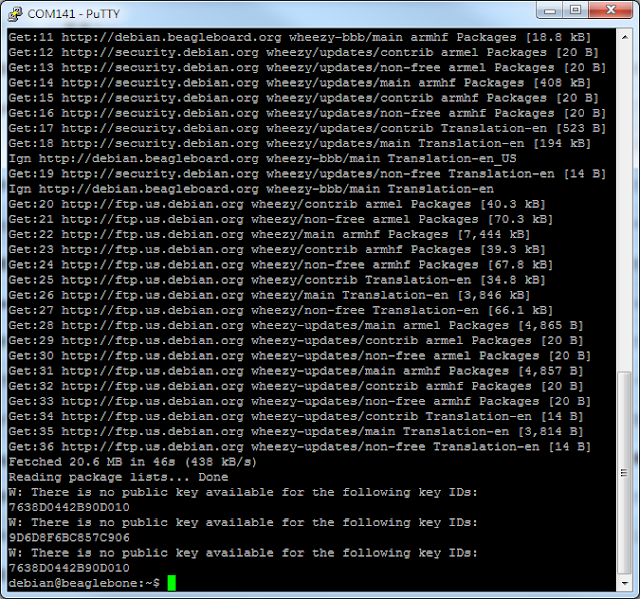
Down load latest firmware form beagleboard.org Recommended Debian Images Wheezy for BeagleBone, BeagleBone Black and Seeed BeagleBone Green via microSD card Debian   7.9  ( BeagleBone, BeagleBone Black, Seeed BeagleBone Green  -  4GB SD )  2015-11-12   -  more info  -  bmap  - sha256sum:  f6e67ba01ff69d20f2c655f5e429c3e6c2398123bcd3d8d548460c597275d277 Jessie for BeagleBone, BeagleBone Black, SeeedStudio BeagleBone Green, element14 BeagleBone Black Industrial and Arrow BeagleBone Black Industrial via microSD card Debian   8.3  ( BeagleBone, BeagleBone Black, SeeedStudio BeagleBone Green, element14 BeagleBone Black Industrial, Arrow BeagleBone Black Industrial  - 4GB SD )  2016-01-24   -  more info  -  bmap  - sha256sum:  da97d7794d834ee785265162635aedcca80fd6dc374593dd05473c0a25f0ac73 There so many hardware version of beaglebone black... even industrial version, wi...

MS SQL for Beaglebone black Debian

圖片
sudo apt - get -- assume - yes update sudo apt - get -- assume - yes install freetds - dev freetds - bin it would take some time on processing triggers for man-db ... sudo apt - get -- assume - yes install python - dev python - pip sudo pip install pymssql gcc take some times...be patient.... imported with no error when using MSSQL account I got error: Traceback (most recent call last):   File "<stdin>", line 1, in <module>   File "pymssql.pyx", line 641, in pymssql.connect (pymssql.c:10788) pymssql.OperationalError: (40615, "Cannot open server 'tiked' requested by the login. Client                                        with IP address '123.50.61.133' is not allowed to access the server.  To enable access, use                   ...

Raspberry Pi start for my IOT uart and PyBBIO server(also on PC)

圖片
After several time of pushing, there is still no BBB... now need to get a Pi for testing my IOT set. Installed Dabian for Raspberry Pi, when frist run up it would bring up raspi- config    for configuration, I expand file system to full sd card, and changed password, then  need to change thekeyboard lay out.... we can also execute raspi-config to change anything should log in as : pi It comes with DHCP, so obtain IP automatic SCP server is also installed, winSCP can work it seems broadcom uart is shown as ttyAMA0 Python is version 2.7.3 start with a python uart testing: import serial import array ser=serial.Serial('/dev/ttyAMA0',115200,timeout=1) LedOn=[0xFF,0xFF,0x00,0x01,0xFF,0xFF,0xFF,0xFF,0xFF,0xFF,0xFF,0x0D] Test=[0x41,0x42,0x43,0x44,0x45,0x46,0x47,0x48,0x49,0x50,0x51,0x0D] ser.write(array.array('B',LedOn).tostring()) ser.write("test on pi uart ttyAMA0") ser.close() the program need to execute as r...

software defined radio ADS-B

圖片
For boat AIS scanner: http://www.rtl-sdr.com/rtl-sdr-tutorial-cheap-ais-ship-tracking/ For air craft: http://www.rtl-sdr.com/adsb-aircraft-radar-with-rtl-sdr/ Both need a 820T dongle, For air, ADS-B, the frequency works on 1090Mhz, so a right antenna is needed. And a quick start with Software Define Radio, is shown here: http://www.rtl-sdr.com/rtl-sdr-quick-start-guide/ First test with  SDRSharp: My first installation of driver ended with time out....try to find out why..... updating zadig from here:  http://zadig.akeo.ie/ It turns out that my PC still have windows running at that time. I finished the update and run again the Zadig, it turns out fine. but sdrsharp can't work, I hvae netfram on PC, but still try 3.5... after installation of 3.5, SDRsharp works.... I hook up an 1.2G antenna, and get some signal on 1090Mhz from air, using ADSBsharp, I do get  strings... From air.... Follow guide here: http://rtlsdrblog.rtlsdrblog.netdna-cdn.com/wp-conte...

2015/7/18 An unplanned trip from 碧砂 to 烏石

圖片
原本  Gill team預計從碧砂17:00夜航到烏石, 周日下午15:00再回烏石... 使用 hunter 33 風行者號, 成員6人 最終於18:00出航, 23:30返航碧砂....失敗 黃色為出發的航跡... 紅色為tacking後航跡 綠色圍往北再tacking,之後決定返航的航跡(by 老宋)..... 事後分析: 缺乏正確的航行計畫: 出發時間: 17:00並不是配合潮汐選的, hunter 33當天有其他活動至下午16:00, 又因港口加油站只到14:30,必須開車到加油站買柴油, 實際出航時間已是18:00之後, 當天的滿潮約是21:00, 所以出發遇到相當大的漲潮流 天氣: 當日的風況及海象根據氣樣局預報都很小, 實際傍晚有約17-20節風, 浪不大,但偶有湧, 所幸大家都有救生衣,在甲板上的全員穿上... 剛出發時有晚霞,日落後有低雲,索性稍後晴朗出現星星... 水及食物(泡麵)零食(香蕉,滷味)都有足夠6人一晚的使用, 風浪略大,只有一個人有勇氣吃一根香蕉...回程順流,風浪較小一些,除了嘔吐的人以外,大家都吃了些麵包 船隻狀況不良: 動力方面:engine狀況不好,油門加略大會有黑煙及異音, 無轉速表, 無油量表....動力大約只夠在平順的海況順順推... 帆: 主帆完整操控順利, 前帆的furling 基本上是壞的, 前帆如果要升帆需要有人在前面將帆順入導軌, 當晚浪況根視線都不允許這樣做.....以免MOB 航儀: No Rada, nor AIS , 航行燈: 左紅右綠,尾燈正常 GPS 海圖機:無.....出海後是靠著老宋的手機海圖,跟陸地上的燈塔(鼻頭角,三貂角)來做航向的定位 速度計: 失效 無 SOG,無對水速度... auto pilot有效, 可對磁方位定向, 但儀器上的磁方位跟舵輪前的羅盤對不上....約有20~60的差異... 也跟老宋的手機方位對不起來.... wench:右前的wench只有一速, 另一向的第二速失效, 主帆其實不好拉出...main sheet還好.... 風標: works fine...還好.... 港口出發後, 開引擎升主帆朝auto pilot 40度方向前進,風向角約30-40,度 除速度未知外一切還好...

Insert data to local mysql server from python connector on beaglebone with angstrom

圖片
I have tested my python connector on PC in this article: Insert data to a mysql server from python ON PC with windows But the funny thing is that when I move every thing on a beaglebone with Angstrom, I got conection refused error on localhost:3306, I have checked my my.cnf file under etc/ [client] #password = password port         = 3306 socket = /tmp/mysql.sock [mysqld_safe] err-log = /var/log/mysql.err [mysqld] user = mysql port = 3306 socket = /tmp/mysql.sock pid-file = /var/lib/mysql/mysqld.pid log-error = /var/log/mysqld.err basedir = /usr datadir = /var/mysql skip-locking loose-skip-innodb skip-networking bind-address = localhost Google it, there are several possibilities: port or socket not correct, but from above, I believe both are correct. about the bind-address, there are 2 different talk using mysqladmin variables | grep port...