發表文章

control SJ4000 wifi through HTTP

圖片
http://sj4000programming.sourceforge.net/0.7.0/html/book.html you can communicate with the camera through HTTP service, including changing camera mode, and shooting photo...etc. Checking Camera Mode To check for current mode the camera is operating in,default is video mode, open your web browser to the following URL: http://192.168.1.254/?custom=1&cmd=3016 The camera will return HTTP 200 response, using  text/xml  content type with appropriate content length, and following XML content: <?xml version="1.0" encoding="UTF-8" ?> <Function> <Cmd>3016</Cmd> <Status> MODENUMBER </Status> </Function> Each line is terminated by a single LF (ASCII 10) character except the last line (which is not terminated). and  MODENUMBER  part will be one of these camera mode numbers: Table 7.2. List of returned camera mode numbers Camera mode number Camera mode 0 Photo shooting mode 1 Video recording mode 3 T...

micropython on esp32 Part2: IDE

圖片
For the IDE, uPyCraft, you will need python 3.7, so go to their page and down load: The good thing is that in 3.7, the installer will add python path to PATH wait for the installation to complete Install uPyCraft IDE – Windows PC it could ask for update.. it seems uPyCraft can also burn uPy firmware on to ESP https://randomnerdtutorials.com/flash-upload-micropython-firmware-esp32-esp8266/ This is the article I refered to start with uPyCraft https://randomnerdtutorials.com/getting-started-micropython-esp32-esp8266/ I copy and past the LED code, the great thing is that you don't have to wait form the compiling time, just down load it and run... But there are chances that the communication with the board goes wrong, then you can always press STOP, or reset the board.

Micropython in esp32 part1: install firmware

圖片
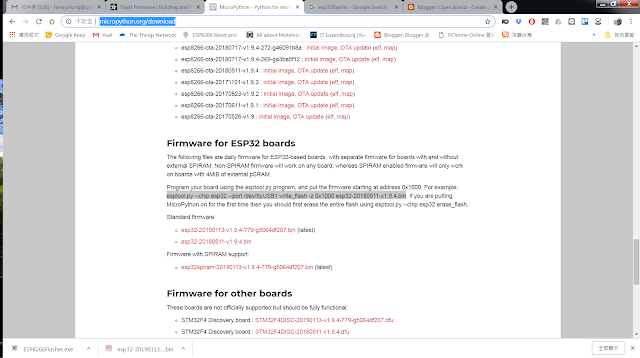
The first trick is to install micropython firmware to esp32 in windows. you can find firmware for esp32 from here: http://micropython.org/download make sure you down load the right one, I down loaded the non spiram version, the standard one. Then, it comes to how to write firmware to board under windows. I have python 2.7 on my PC, so install esptool through pip seems easy. pip install esptool Then in the folder you put the downloaded firmware, esptool.exe  --chip esp32 --port COM26 write_flash -z 0x1000 esp32-20190113-v1.9.4.bin the it would do the trick...

Orange DSM2/DSMx tx modules... how to make it work correctly?

圖片
I have been using turnigy controller for quite a long time.... The first module I used is a orange rx module: I'm not sure what is the version I have, but I guess it's v1, it communicate with controller through PPM, so it fit into my old JR 9X II as well. it does support 4 types of DSM. at binding, it will try to find out what is the dsm type of receiver, and set itself into that mode, and stay in that mode. and the LED will blink according to the mode: DSM2 1024: no LED DSM2 2048:1 blink DSMX 22ms: 2 blinks DSMX 11ms: 3 blinks If your last fly is with DSM2 2014 receiver(such as old orange 6 chs), and try to fly with receiver in another mode, you will see the light on receiver is on, but servo does move,(or some move, some does not, incorrect any way...) you can press the bind button 3 times(fast..) to switch operation mode of the module in sequence, you can see this through LED,and find the one works... Some times later, there is a internal module: ...

Beaglebone industrial

圖片
there are 2 versions of beaglebone industrial on the market these days(2018/4). 1. red version: element 14 2. Arrow one. it is industrial temp version of beaglebone black. but seems the page disappeared on 4/16/2018 3. beaglecore http://beaglecore.com/ shop  https://www.conrad.com/ce/en/product/1551255/BEAGLECORE-CPU-module-BCM1ETR?ref=searchDetail they do module with industrial temp, and promise support upto 2023. seems Germany made. and still open source.  https://github.com/BeagleCore/Hardware also comes with tape and reel. The best thing of beaglebone is that it has tones of uart for industrial usage. uart0 to uart 5. uart 0 is predefined as debugger port. uart 3 has pin conflict with HDMI(not a problem if u don't use HDMI), so the first used ones are: uart 1,2,4,5 as the latest debain for beaglebone, the hardware configuration is upto user. So, to enable these uarts: refer to  https://billwaa.wordpress.com/2014/10/13/beaglebone-black-enable-all-uart-po...